How I Build Organic Visibility — From Technical Foundation to Publishing
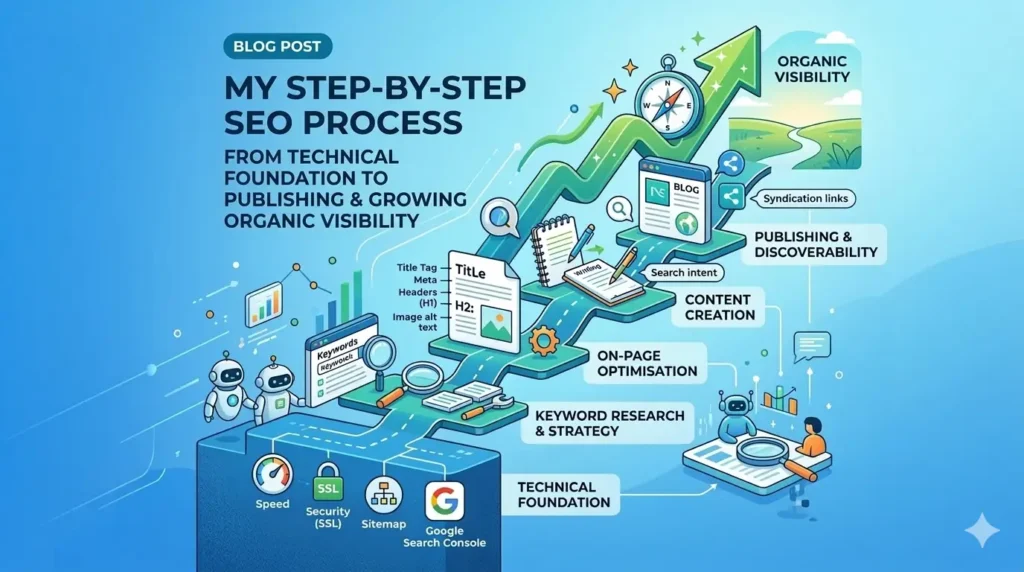
SEO isn’t magic it’s a repeatable process. Over the years, running digital marketing for clients at Proximite Group, I’ve refined a consistent workflow that I apply to every website and every blog post I publish. This post breaks down exactly what I do, step by step.
Step 1: Build the Technical Foundation
Before writing a single word of content, I make sure the technical bones of the website are solid. Search engines can’t rank what they can’t crawl or trust.
Technical Setup Checklist
- Website is mobile-responsive (Google ranks mobile-first)
- HTTPS/SSL certificate installed and active
- Page load speed under 3 seconds (target under 2s for mobile)
- Clean, readable URL structure — no unnecessary parameters
- sitemap.xml created and submitted to Google Search Console
- robots.txt configured to allow important pages to be crawled
- Google Search Console connected to the domain
- Google Analytics installed and goals configured
For client sites, I run Screaming Frog to crawl the full site and export technical issues like broken links, missing H1s, duplicate titles, and 4XX errors. I cross-reference findings with PageSpeed Insights (Google’s official tool) for Core Web Vitals specifically LCP (Largest Contentful Paint), CLS, and FID. These are non-negotiable ranking signals now.
Step 2: Keyword Research
Good keyword research tells me what my audience is searching for — and how competitive those searches are. I work top-down: start broad, then find the specific angles worth targeting.
My Keyword Framework
- Primary Keyword: The single most important search term for the page. Everything is optimised around this.
- Secondary Keywords: Supporting terms that add context — usually variations of the primary keyword.
- Long-tail Keywords: More specific phrases (4+ words) that are easier to rank for and signal clear intent.
- LSI Keywords: Semantically related terms that help search engines understand the full topic.
- Geo-Modified Keywords: Location-specific variations — e.g., ‘business bank account Dubai’ vs ‘business bank account UAE’.
Tools I Use
- Google Keyword Planner — free, great for volume data
- Ubersuggest — good for quick competitor gap analysis
- Ahrefs / Moz — for deeper backlink and keyword research on client projects
- Google Search Console — to find what terms I’m already ranking for
The output of this step is a clear list: one primary keyword, three to five secondary keywords, and a bank of long-tail and LSI terms I’ll weave through the content naturally.
Step 3: On-Page Optimisation
This is where I make each individual page as relevant and readable as possible for both searchers and search engines. Every page gets the same treatment.
The On-Page Checklist
- Title Tag (55–60 characters): Contains the primary keyword, ideally near the start. Unique for every page.
- Meta Description (150–160 characters): Compelling summary with the primary keyword. Drives click-through rate — not a direct ranking factor, but critical for traffic.
- URL Slug: Short, keyword-rich, hyphen-separated. No stop words (the, and, of). Example: ‘uae-business-bank-account-documents’ not ‘documents-required-to-open-a-business-bank-account-in-the-uae-2026’.
- H1 Tag: One per page. Contains the primary keyword.
- H2 / H3 Tags: Structure the content logically. Include secondary keywords and keyword variations naturally.
- Keyword Placement: Primary keyword in first paragraph, then distributed naturally throughout — no stuffing.
- Image Alt Text: Descriptive alt text on every image, with keywords where appropriate.
- Internal Links: Link to 2–4 related pages on the same site to distribute authority and help crawlers.
- Schema Markup: Article or HowTo schema where relevant, to qualify for rich results.
Step 4: Content Creation
Content is where SEO either wins or fails. Technical perfection means nothing if the content doesn’t satisfy search intent. I write for humans first, optimise for search engines second.
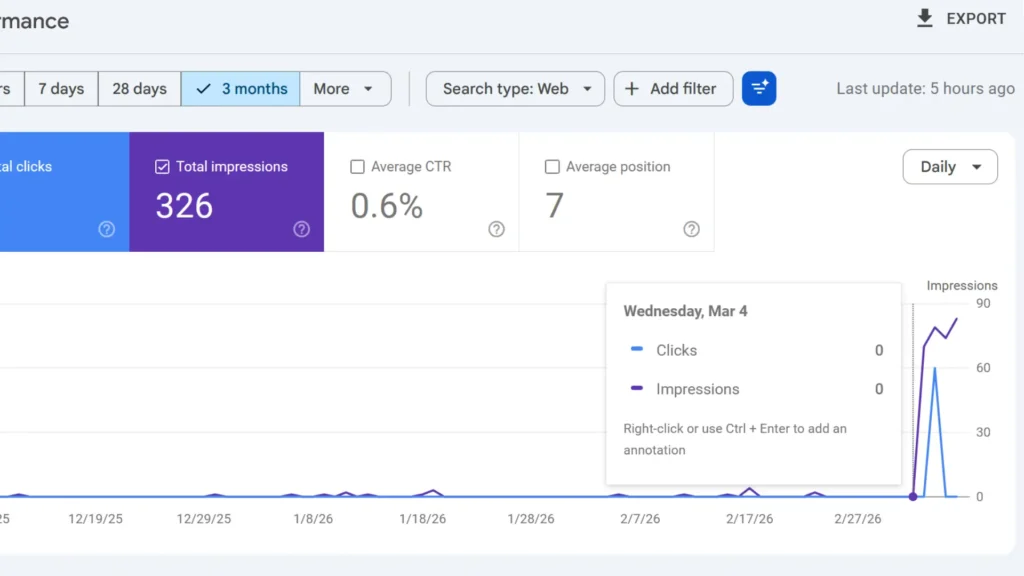
This image proves that content is important. I started my blog posts on 3rd of March and within 3 days my impressions starts increasing.
Content Quality Standards
- Minimum 300–500 words for simple pages; 1,000–2,000+ for competitive topics
- Addresses the search intent directly — informational, transactional, or navigational
- Table of contents for long-form content (improves navigation and dwell time)
- FAQ section to capture related search queries and potential featured snippets
- Fresh, original insights — not just rewording what’s already ranking
- Regular updates to keep content current (especially for year-specific topics like ‘2026 guides’)
Step 5: Making Content Discoverable
Publishing isn’t the finish line it’s the start. Google needs to find and index the content, and people need a reason to link to it.
Submission and Indexing
- Submit updated sitemap.xml to Google Search Console after publishing
- Use the ‘Request Indexing’ feature in GSC for important new pages
- Share on relevant social channels to generate early traffic signals
- Cross-post or syndicate to Medium, WordPress.com, or LinkedIn Articles as backlink sources
Link Building
Authority comes from backlinks. My approach focuses on quality over quantity:
- Create a backlink post on WordPress.com or Medium summarising the article and linking back to the original
- Guest posting on relevant blogs in the niche
- Share content in communities where the target audience is active
- Internal linking from older high-traffic posts to new content
- Disavow spammy backlinks to keep the link profile clean
Step 6: Tracking and Ongoing Monitoring
SEO is not a one-time task. Rankings shift, competitors publish, and Google updates its algorithm. I build monitoring into every project from day one.
What I Track
- Keyword rankings — baseline documented before any work begins
- Organic traffic — month-over-month in Google Analytics
- Core Web Vitals — monitored in Google Search Console (Experience → Core Web Vitals)
- Backlink profile — new links, lost links, spam score (via Moz or Ahrefs)
- Crawl errors and indexing issues — GSC Coverage report
- Click-through rates — title/meta desc A/B testing based on GSC data
- Conversion tracking — leads, sign-ups, or purchases attributed to organic traffic
Review Cadence
- Weekly: Check GSC for crawl errors and new impressions
- Monthly: Review rankings, traffic trends, and backlink changes
- Quarterly: Full technical audit with Screaming Frog, content refresh review, competitor gap analysis
Quick Reference: My SEO Workflow at a Glance
| Step | What I Do | Key Tools |
| 1. Technical Setup | Mobile, HTTPS, speed, sitemap, GSC, GA | Screaming Frog, PageSpeed Insights, GSC |
| 2. Keyword Research | Primary, secondary, long-tail, LSI, geo keywords | Google KP, Ubersuggest, Ahrefs |
| 3. On-Page SEO | Title, meta desc, slug, headers, internal links | Yoast / Rank Math, manual review |
| 4. Content Creation | Search intent, structure, FAQ, social metadata | WordPress, Open Graph tags |
| 5. Discoverability | Sitemap submission, backlinks, syndication | GSC, WordPress.com, Medium |
| 6. Monitoring | Rankings, traffic, CWV, backlinks, CTR | GSC, GA4, Moz, Ahrefs |
Final Thought
SEO is slow, and that’s the point. The process above isn’t a shortcut it’s a system. Follow it consistently across every page you publish, and the compounding effect over six to twelve months is significant. The sites that win in search are the ones that treat every page as an asset worth building properly.
If you’re doing SEO for your own business or a client, start with the technical audit you can’t build authority on a broken foundation. Get that right first, then focus on keyword research and content. Everything else follows.